At the most basic level, PDM (product data management) software manages your engineering files, such as CAD (computer-aided design) models, drawings, and revisions, in a controlled vault. PLM (product lifecycle management) manages the product itself: change processes, bills of materials (BOMs), projects, and compliance, from first concept to end of life.
That’s the clean version. The honest version: The boundary is blurry, vendors label things inconsistently, and modern PLM builds directly on PDM rather than replacing it. Here’s how we explain PDM vs PLM, drawing on the nearly 2,000 PDM and PLM customers we’ve taken into production, and how to figure out which one your team needs.
Side-by-Side Comparison
| PDM Software | PLM Software | |
|---|---|---|
| What it manages | Files: CAD models, drawings, and related documents | Records: products, processes, projects, and items, with or without files attached |
| Core functions | Vaulting, version control, check-in and check-out, release workflows, permissions, and search | Everything PDM does, plus purpose-built functions for quality management processes, BOM management, configuration management, project and program management, and supplier management, to name a few. All of it keeps real-time metrics you can use to build powerful dashboards and reports. |
| Primary users | Engineering, plus read access for adjacent teams | The entire organization, across the entire product lifecycle |
| Implementation time | A few weeks to a couple of months | Roughly 6 to 12 months for an initial go-live, and shorter for narrower use cases |
What PDM Software Covers (and Where It Stops)
PDM earns its keep quickly: a single source of truth for design files, automatic handling of CAD references (rename a part used in 40 assemblies and nothing breaks), revision history, and release workflows that keep the shop floor on released data only. For a full walkthrough, see What Is PDM? Product Data Management Explained for Engineering Teams.
But PDM is fundamentally a file-based system, and that defines its boundary. In practice, PDM is limited when you need to:
- Build a flat purchasing BOM: What sets PLM apart is the ability to manage the BOM as its own object, one that references up-to-date CAD data but can be formatted for any purpose you wish. Engineering, manufacturing, and flattened procurement BOMs are typical examples.
- Manage things that aren’t files: Coating materials, packaging, spare-part kits, purchased items, and manufacturing materials with no CAD model don’t exist in a file vault.
- Run a process that isn’t dependent on a single file: A file lives in one workflow, in one state at a time. A change affecting many files across several departments needs a process object of its own.
- Manage projects and tasks: PDM notifications tell you something happened, but they don’t assign work, track milestones, or show a manager which projects are slipping. Most PDM-only teams still run project management in spreadsheets or Microsoft Project, disconnected from the design data.
- Give those outside engineering and CAD real visibility: Search and read-only views are an immense help, but stakeholders outside engineering want live dashboards and reports, not a folder tree.
If those limits sound familiar, you’re describing the three classic signs of outgrowing PDM: BOM demands, task and project tracking, and stakeholder visibility.
What PLM Adds
PLM systems are record-based. Any record can be related to any other data, whether or not a file is involved. That unlocks:
- Formal change management: An engineering change order (ECO) becomes its own record with a workflow, approvers by stage, affected files attached, and automatic generation of the change notice, including notifying vendors and customers without giving them vault access. For a deeper look, read our Engineering Change Management Guide and Better Manage Your Projects, Processes, and BOMs With SOLIDWORKS Manage.
- BOMs for every audience: Flat purchasing BOMs in one click, manufacturing and shipping variants, non-modeled items, and BOM comparison between any two records, plus push and pull to enterprise resource planning (ERP) and material requirements planning (MRP) systems to eliminate duplicate data entry.
- Project management tied to design data: Tasks are assigned to real people, connected to actual CAD files, and rolled up in Gantt charts and dashboards.
- Compliance and traceability: Full process history, showing who approved what and when, gives auditors a trail they can follow. One of our presenters, who previously worked at an ISO (International Organization for Standardization) certified manufacturer, said auditors told them the way their solution was implemented saved the auditors hours and hours of audit time.
The Middle Ground: Cloud Platforms (3DEXPERIENCE and ENOVIA)
There’s a third path that doesn’t fit the classic on-premises PDM-then-PLM ladder. The 3DEXPERIENCE platform is Dassault Systèmes’ cloud-native environment, and its PLM capability comes from ENOVIA, enterprise PLM technology delivered as browser-based, role-by-role subscriptions instead of a monolithic install.
It changes the decision in three ways:
- Infrastructure disappears: There is no SQL server, no vault hardware, and no upgrade project. The platform is software as a service (SaaS) on Dassault Systèmes’ own cloud.
- Multi-CAD gets easier: If your data is a mix of SOLIDWORKS, electrical CAD, and other mechanical CAD, cloud PLM handles the blend better than a SOLIDWORKS-centric vault.
- You scale by role, not by re-platforming: Start with cloud data management (Cloud Services is included with active SOLIDWORKS subscriptions), then add change management, project planning, or manufacturing BOM roles as needed.
The trade-off: If security policy prohibits public cloud, or your processes demand deep customization, the on-premises PDM and SOLIDWORKS Manage stack remains the fit.
Decision Framework: Answer These Five Questions
- Does the BOM straight out of CAD satisfy everyone who consumes it? If yes, PDM is enough. If purchasing wants flat BOMs, variants, or non-modeled items, that points to PLM.
- Do your change processes involve people or items outside engineering? If ECOs need approvals from quality, purchasing, or operations, and affect non-CAD items, you need PLM-grade process management.
- How much of your data isn’t SOLIDWORKS, or isn’t files at all? Mostly SOLIDWORKS files point to PDM. Multi-CAD or heavy non-file items point to PLM, so look hard at the cloud option.
- Who needs visibility? If engineering and occasional viewers are your only users, PDM fits. Managers and other departments that need live dashboards and fully connected processes point to PLM.
- Are you in a regulated industry? Documented, auditable process control (medical, aerospace, and defense) is a PLM trigger regardless of team size.
Score yourself honestly: Teams that answer “PDM” on all five but buy PLM anyway are paying for shelfware. Teams that answer “PLM” on two or more and keep using folders pay in scrap and audit findings.
Migration Paths and Typical Costs
The good news about the SOLIDWORKS ladder is that steps up aren’t migrations:
- PDM Standard to PDM Professional: SOLIDWORKS PDM Standard is included with SOLIDWORKS Professional and SOLIDWORKS Premium, and it runs on Microsoft SQL Server Express. Moving to PDM Professional is a database upgrade to SQL Server Standard or Enterprise, and your data stays put. There is a cost for SQL Server in addition to upgrading your PDM licenses.
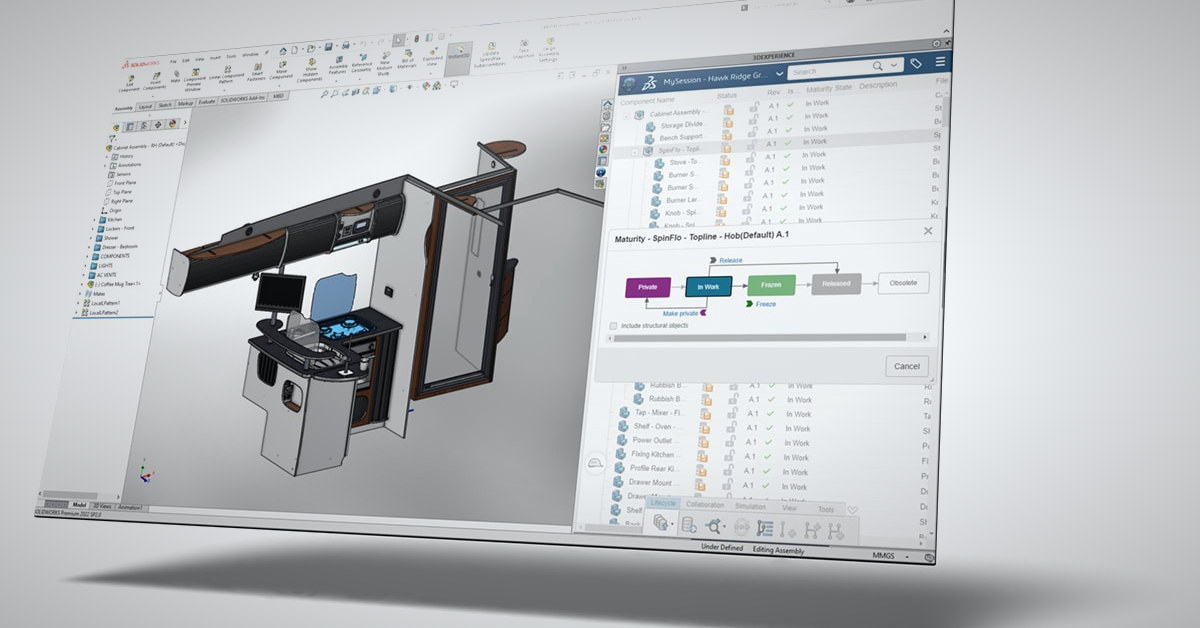
- PDM Professional to SOLIDWORKS Manage: Manage adds a layer on top of your existing vault with no data migration. Upgrade costs include licensing and implementation. PDM Professional and Manage both use global floating licenses rather than per-named-user licenses.
- SOLIDWORKS PDM, SOLIDWORKS Manage, or no data management to 3DEXPERIENCE: If you choose 3DEXPERIENCE for PDM and PLM, there is a migration path to get you there.
Honest guidance on PDM-first vs PLM-first: Most teams should take the ladder, with PDM first and PLM when the three outgrowing signs appear. Go PLM-first when you’re multi-CAD from day one, cloud-mandated, or regulated to a degree that file control alone can’t satisfy.
What you shouldn’t do is buy traditional enterprise PLM for a 15-person engineering team. The feedback we consistently hear from customers leaving those systems is that they were too complex to implement and administer, and they never ended up fully deployed.
Choosing the Right Fit
PDM and PLM aren’t competing choices. They’re steps on the same path. PDM gives engineering control of its files. PLM extends that control to the people, processes, and items that surround those files. The right choice depends on where your team is today, not on which system has the longer feature list.
Start with the five questions above. If PDM answers your needs, get it in place and get the benefit quickly, and if you already have SOLIDWORKS Professional or Premium, PDM Standard is included. If two or more answers point to PLM, plan for it now, because the cost of waiting shows up in scrap, rework, and audit findings. If you’re multi-CAD, cloud-first, or tired of maintaining servers, put the 3DEXPERIENCE platform on your shortlist.
Whatever you choose, plan it around how your team actually works. After taking nearly 2,000 PDM and PLM customers into production, our application engineers have seen almost every starting point, and they can help you figure out which step makes sense for you.
Not sure which side of the line you’re on? Read Looking for a PLM Solution? Consider SOLIDWORKS Manage, or talk to a data management expert at Hawk Ridge Systems.
Frequently Asked Questions
Is PDM part of PLM?
Functionally, yes. Data management is the foundation layer of any PLM system, because you can’t manage a product’s lifecycle without controlling its design files. In the SOLIDWORKS ecosystem, this is literal: SOLIDWORKS Manage and 3DEXPERIENCE include PDM tools to manage your product-related files, while building lifecycle management strategies on top of that.
Can PDM software replace PLM?
For file control, versioning, and release workflows, yes, and many companies need nothing more for years. PDM cannot replace PLM’s flexible, robust BOM management, non-CAD items, cross-department processes, or project management. If you’re not missing those, you don’t need PLM yet.
What does PLM software cost?
It varies enormously by the software solution chosen, user count, and implementation scope. Check our current promotions to save on costs.
What is ENOVIA?
ENOVIA is Dassault Systèmes’ enterprise PLM technology and the engine behind 3DEXPERIENCE cloud PLM. Instead of a traditional on-premises install, it’s delivered through browser-based roles on the 3DEXPERIENCE platform and covers change management, BOM management, project planning, compliance, and more: anything an organization needs from start to finish in its product lifecycle.