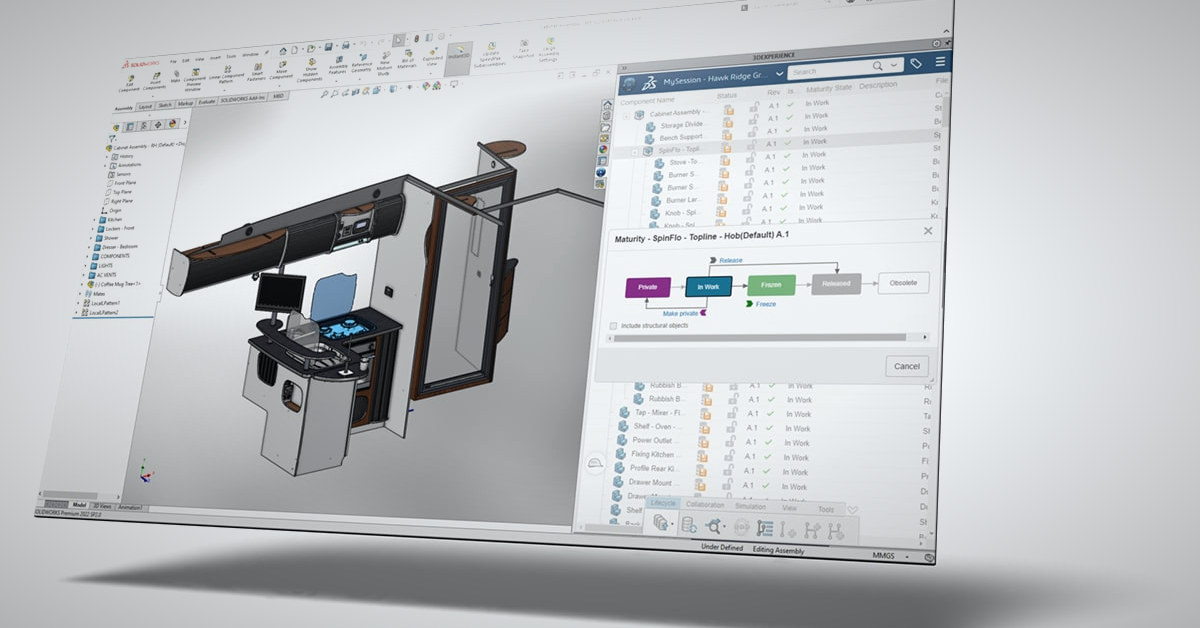
Product data management (PDM) is the foundation of engineering data management: it gives engineering teams one secure, version-controlled vault for every CAD file, drawing, and document — so there is always one correct copy, a full revision history, and controlled access. It helps mitigate the shared-network-drive habits that cause overwritten work, incorrect versions on the shop floor, broken references, and time lost.
You may already have PDM. SOLIDWORKS PDM Standard is included with SOLIDWORKS Professional, Premium, and Ultimate licenses, so many teams already own an entry point at no additional software cost. They just aren’t using it. Why?
Product data management (PDM) is a system that stores your engineering files in a secure, version-controlled vault — so every CAD model, drawing, and related document has one correct copy, a complete revision history, and controlled access for everyone who needs it. In short, PDM is the foundation of engineering data management for any CAD-driven team.

Think of it as a library system for engineering data: files are checked out, worked on by one person at a time, checked back in, and every change is recorded. If you’ve ever lost an afternoon to a file named bracket_final_v2_FINAL(3).sldprt, PDM is the fix.
Two things PDM is not:
- It’s not just a shared folder. It’s an actual controlled system with robust permissions administration that prevents some of the most common disasters. For example, two engineers saving over each other’s work or building from last month’s revision when there is a more recent one.
- It’s not full PLM. PDM manages your design files and the processes around them. Product lifecycle management (PLM) extends beyond engineering into projects, non-CAD items, and company-wide processes.
See our PDM vs. PLM comparison in the Data Solutions Buyer’s Guide for where the line sits.
The Problem PDM Solves
Most teams don’t start with PDM. Their engineering data management starts as a shared network drive, and it works — until it doesn’t. The failure modes are predictable — we see them often:
- Overwritten work. Two engineers open the same assembly, both make changes, only one version gets saved, and it is probably missing the other person’s important work.
- Wrong revisions in manufacturing. Someone on the shop floor browses to the wrong folder, pulls an outdated drawing, and you’re scrapping parts.
- Broken references. A well-meaning colleague renames or moves a part, and every assembly that uses it opens with errors.
- Duplicate files. Several copies of the same bolt scattered across project folders, each named by a different person’s convention.
- Time lost searching. The average engineer spends 10–20% of their time just looking for data. Independent research from Tech-Clarity puts total non-value-added data work at roughly a third of engineering time — searching for information, getting data for other people, and incorporating changes from others top the list.
That last point is where the money is. Using a conservative $50/hour burden rate, a third of an engineer’s year is roughly $32,000. Multiply across a ten-person team and you’re over $300,000 and 6,000 hours annually spent on work that doesn’t move a single design forward.
What a PDM System Actually Does
Vaulting
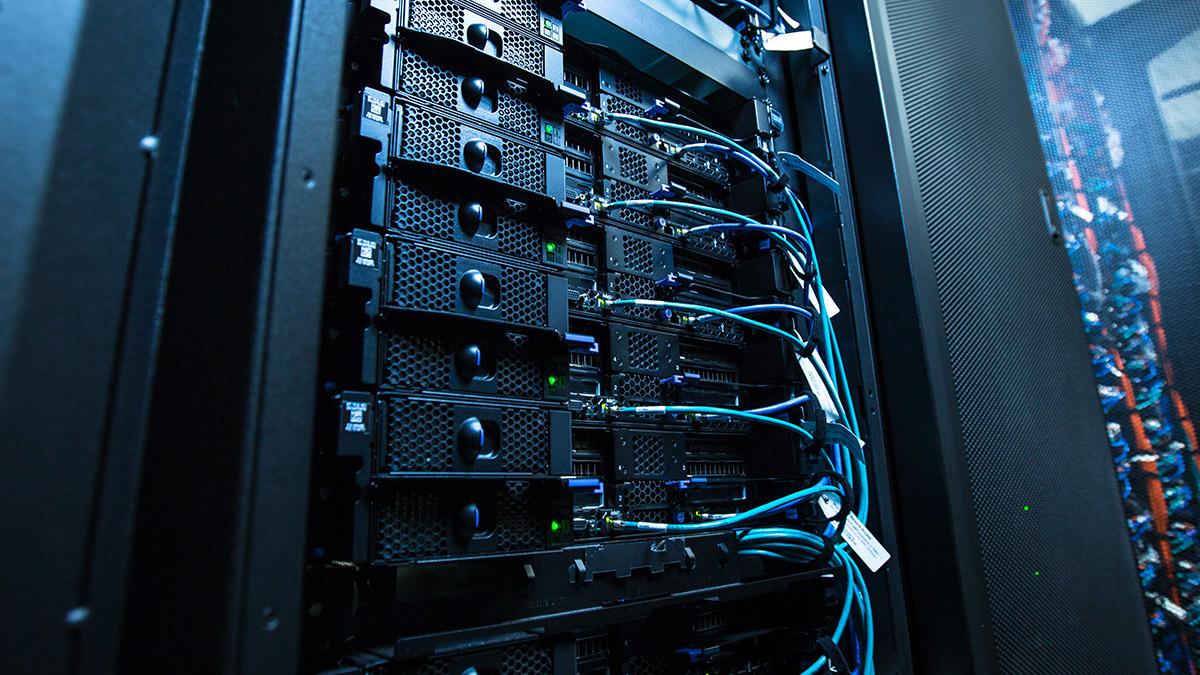
All files live in a secure, server-based vault — hosted on-premises or in the cloud (we run many customer vaults on AWS EC2 and Microsoft Azure). Users interact with it through a familiar interface; in SOLIDWORKS PDM‘s case, it’s Windows Explorer itself. If you can save it in Windows, the vault can manage it — SOLIDWORKS files, other CAD formats, and 200+ file types natively, from Word documents to emails.
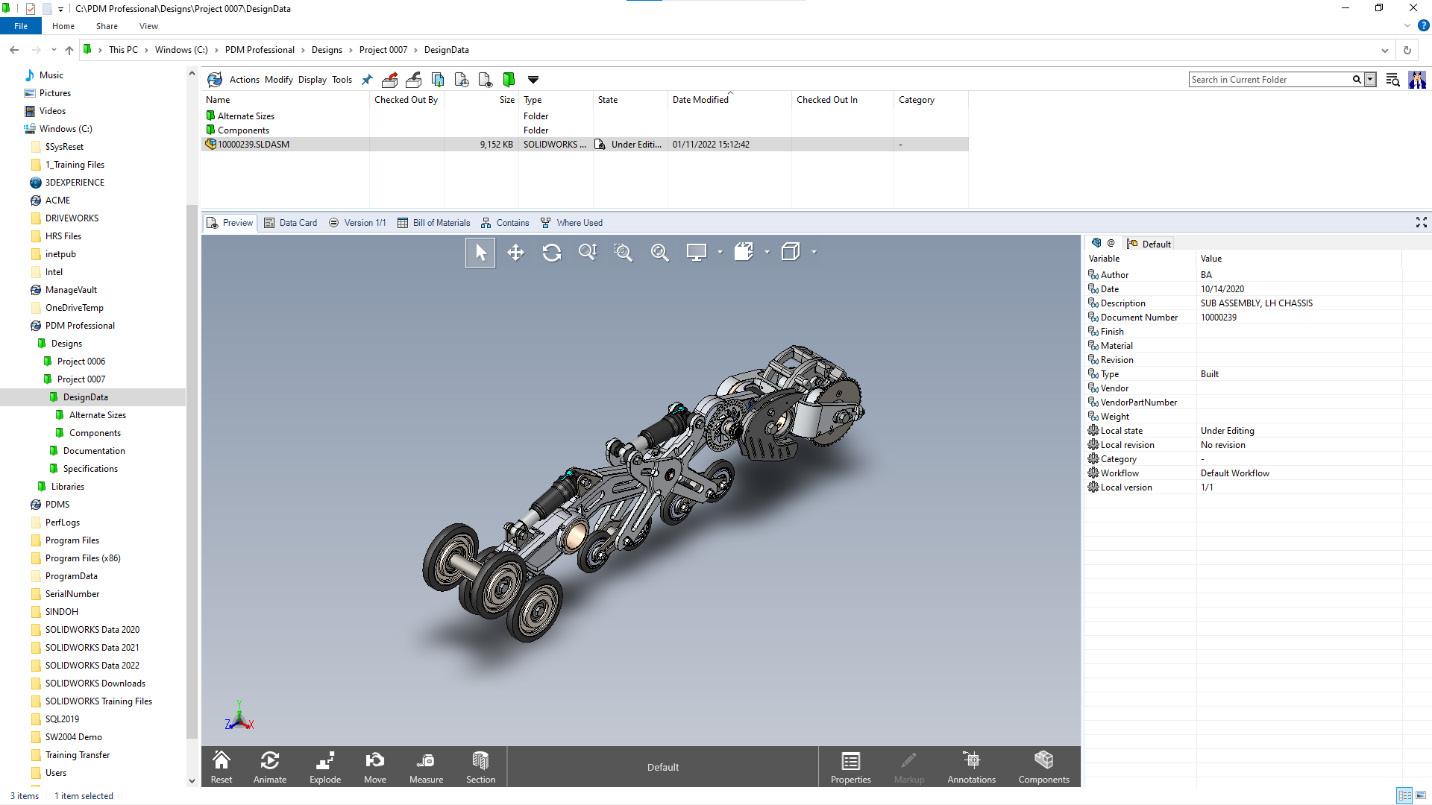
Automated Version Control
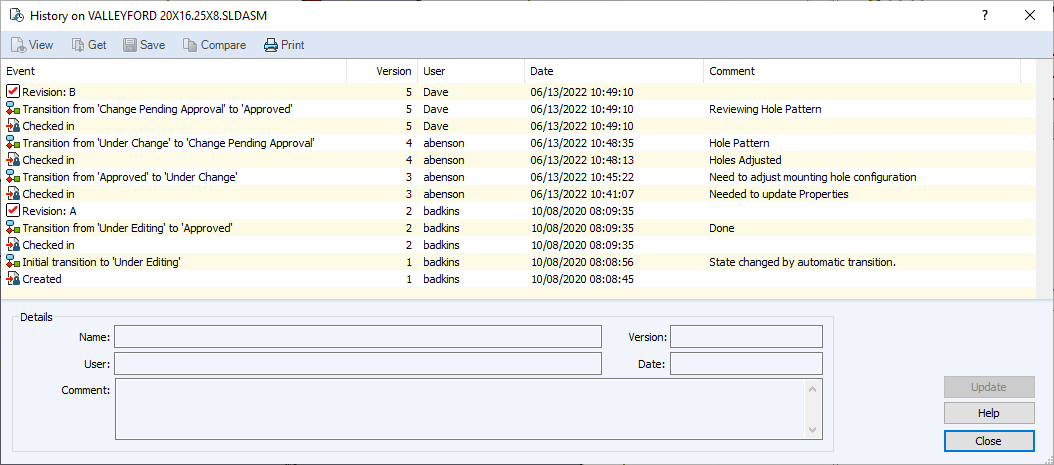
Files are checked out to work on and checked in when done. Only one person can save changes at a time, and every check-in captures a version you can return to later. The full history — who changed what, when, and why — is retained automatically.
Workflows
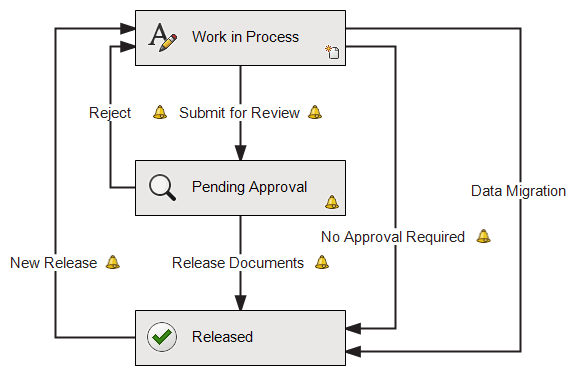
Files move through states you define: under editing, waiting for approval, released. Workflow transitions trigger notifications, stamp revisions, and can automatically generate PDFs or STEP files on release. This is how you guarantee the shop floor only ever sees released data.
Permissions
User- and group-level access controls who can view, edit, and approve which files. Roughly a third of PDM users at our customers aren’t engineers — sales pulling an eDrawings preview for a customer, purchasing exporting a parts list — all working from controlled, read-only copies of the correct data.
Search and BOM Management
Search goes far beyond file names: part number, description, project, customer, or any property you put on a data card. Bills of materials are tracked automatically from your CAD references — quantities update when the assembly does, and you can compare versions to see exactly what changed between revisions.
How PDM Compares to Shared Drives, Cloud Storage, and PLM
The same four options, side by side:
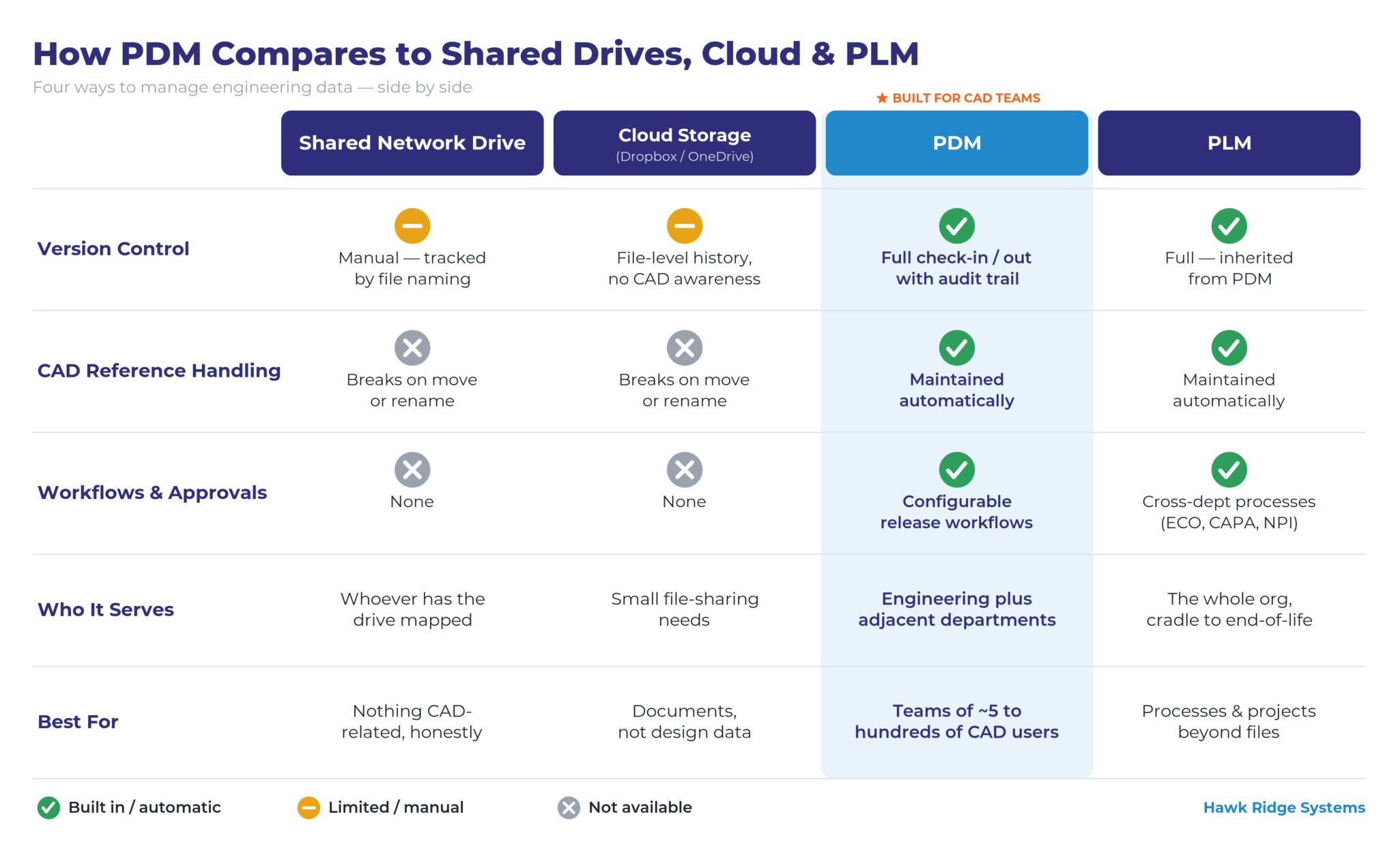
ECO = engineering change order · CAPA = corrective and preventive action · NPI = new product introduction
At a glance:
Version control — Shared network drive: manual, tracked through file naming. Cloud storage (Dropbox/OneDrive): file-level history, no CAD awareness. PDM: full check-in / check-out with an audit trail. PLM: full, inherited from PDM.
CAD reference handling — Shared network drive: breaks on move or rename. Cloud storage (Dropbox/OneDrive): breaks on move or rename. PDM: references maintained automatically. PLM: references maintained automatically.
Workflows & approvals — Shared network drive: none. Cloud storage (Dropbox/OneDrive): none. PDM: configurable release workflows. PLM: cross-department processes (ECO, CAPA, NPI).
Who it serves — Shared network drive: whoever has the drive mapped. Cloud storage (Dropbox/OneDrive): small file-sharing needs. PDM: engineering plus adjacent departments. PLM: the entire organization, cradle to end-of-life.
Best for — Shared network drive: nothing CAD-related, honestly. Cloud storage (Dropbox/OneDrive): documents, not design data. PDM: teams of ~5 to hundreds of CAD users. PLM: companies managing processes and projects beyond files.
7 Signs Your Team Needs PDM Now
- You’ve shipped or scrapped parts made from the wrong revision at least once.
- More than one person has lost work to a save conflict in the past quarter.
- Finding the right file routinely takes longer than five minutes.
- Assemblies open with broken references after someone reorganizes folders.
- You maintain revision history through file-naming conventions — and people don’t follow them.
- People outside engineering email you asking for “the latest drawing.”
- An engineer leaving the company means a scavenger hunt through their local drive.
If three or more of these sound familiar, you’re paying for PDM already — you’re just not getting it.
Not sure whether you already own PDM Standard? Talk to us — we’ll check your license and show you what it unlocks.
What PDM Costs and Typical ROI
Honest answer: it depends on the tier and team size. For the most accurate price, reach out to your rep at Hawk Ridge Systems or contact us and we’ll get you in touch with the right person.
A few things are firm:
- PDM Standard is included with SOLIDWORKS Professional, Premium, and Ultimate licenses, so many teams already own an entry point at no additional software cost.
- PDM Professional adds unlimited workflows, automation, replication, and API access. It’s sold in three license types:
- 1. Viewer (read-only access to the vault)
- 2. Contributor & Web (edit files and data, plus a Microsoft Office add-in)
- 3. CAD Editor & Web (adds the CAD add-in so users work with PDM inside SOLIDWORKS).
Licenses are global and floating rather than tied to named users.
- Training is a known, published cost. The Administering SOLIDWORKS PDM Standard course is $995 per seat and the Administering SOLIDWORKS PDM Professional course is $1,495 per seat. These admin courses are recommended for 1-2 users who will administer the back end of the system.
The ROI side is better documented. The average engineer spends 10–20% of their time searching for data; PDM typically cuts that in half. On implementation timelines: we can get a vault installed and running in a couple of days, but plan on a month or two of configuration, user-acceptance testing, and training before production. Admin training for PDM Professional takes four half-day sessions; end-user training takes one.
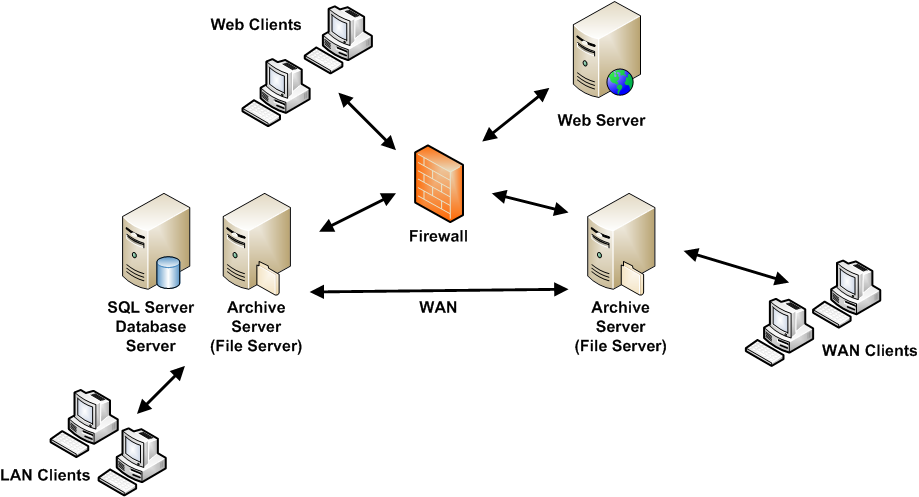
PDM Professional scales the same way whether you’re one site or many. A typical deployment puts a SQL database and archive server behind your firewall, serving LAN, WAN, and web clients:
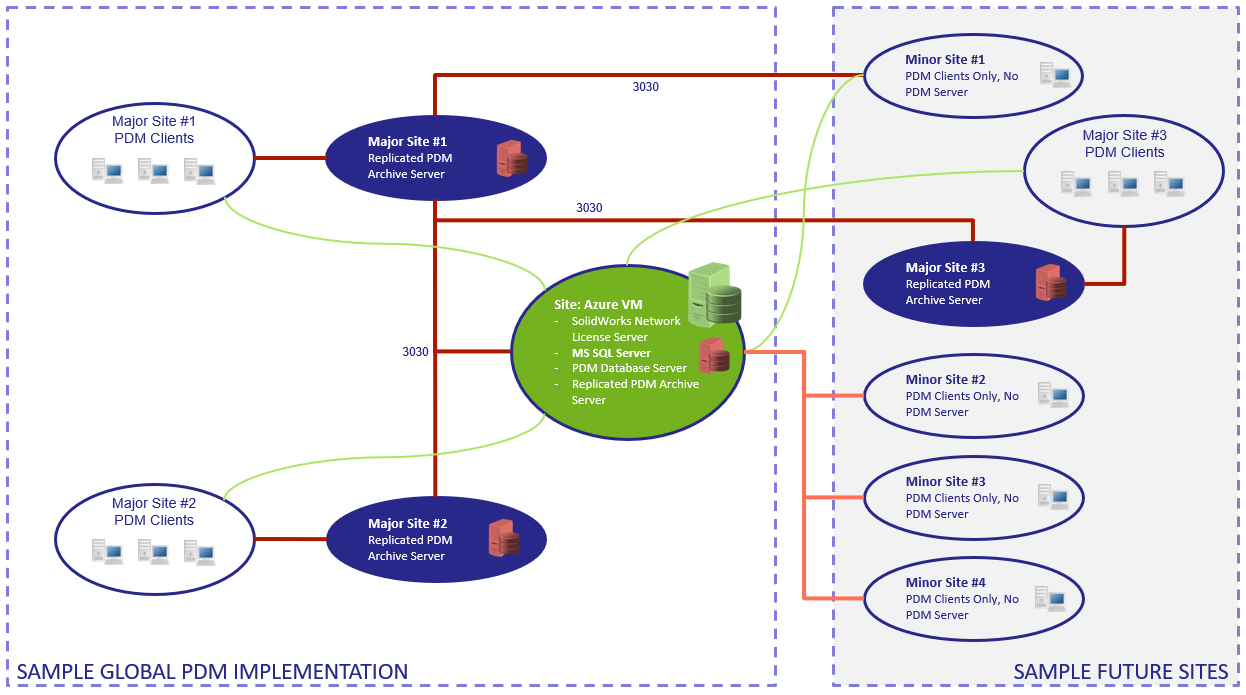
For distributed teams, archive servers replicate across sites, and the vault can be hosted on-premises or in the cloud (we run many customer vaults on AWS EC2 and Microsoft Azure):
For a deeper cost-justification framework, see How to Justify Your Data Management Investment, and grab the full Data Solutions Buyer’s Guide for a side-by-side of every option.
FAQ
What does PDM stand for?
PDM stands for product data management. It’s a category of software that stores engineering files and adjacent documentation in a controlled vault with version history, check-in/check-out, workflows, and permissions — ensuring everyone in the company works from the correct revision of every design file.
Is PDM the same as PLM?
No. PDM manages design files and their revisions within engineering. PLM builds on PDM and extends across the business — managing processes like engineering change orders, projects, non-CAD items, and BOMs for purchasing and manufacturing. Most companies start with PDM and add PLM capabilities as they grow.
Do small teams need PDM?
Yes, arguably more than large ones — a five-person team has no slack to absorb rework from an overwritten file. SOLIDWORKS PDM Standard is included with Professional, Premium, and Ultimate CAD licenses, so for many small teams the software cost is already covered.
How long does PDM take to implement?
The vault itself can be installed in days. Realistic time to production — including configuring workflows to match your processes, testing, and training — is one to two months for a typical deployment. Simpler PDM Standard rollouts can be live in a few weeks.
Does PDM only manage SOLIDWORKS files?
No. SOLIDWORKS PDM natively handles over 200 file formats, including other CAD systems’ files, Office documents, PDFs, images, and emails. If you can save it in Windows, the vault can manage, version, and search it.
Is there a cloud version of PDM?
Yes — with an important distinction. You can host SOLIDWORKS PDM, the file-based system described here, on cloud infrastructure such as AWS or Azure; this keeps PDM’s workflows and CAD-reference handling while moving the servers off-premises. Separately, Dassault Systèmes offers 3DEXPERIENCE Cloud PDM, a cloud-native platform where data lives on the 3DEXPERIENCE platform rather than in a local vault — better suited to distributed teams that want browser access and minimal IT overhead. Which one fits depends on how much customization and local control you need versus cloud-native collaboration.
Ready to make the move? Talk to us about data management — we’ll scope PDM to your team and show it live. Still comparing options? Start with our Data Solutions Buyer’s Guide.