Real World Return on Investment for Simulation Software
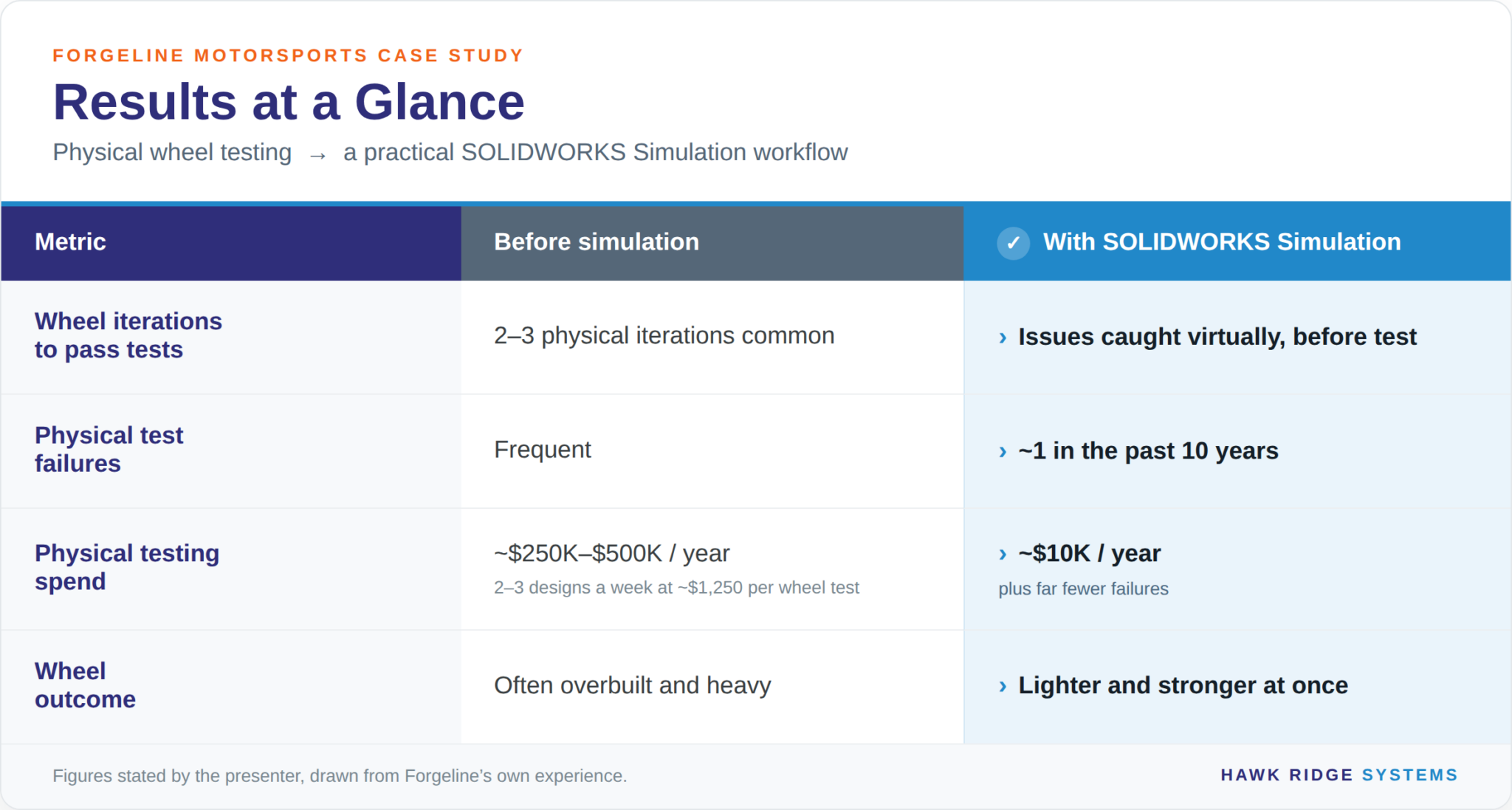
All figures above are stated in the webinar by the presenter, drawn from Forgeline’s own experience.
How Forgeline Motorsports Uses SOLIDWORKS Simulation
Forgeline is an Ohio-based maker of forged, made-to-order performance wheels — every wheel built to the exact size, offset, and finish the customer specifies, appearing on high-profile cars like the Glickenhaus and others. Forged wheels give a better strength-to-weight ratio than cast, and Forgeline has used FEA for more than ten years to push wheels stronger and lighter at once.

Wheels have to survive three standardized physical tests:
- an impact test (curb-strike energy)
- a radial fatigue test
- and an eccentric-mass cornering fatigue test
The insight that makes Forgeline efficient: the cornering fatigue test is almost always the critical case. A wheel that passes cornering fatigue passes radial and impact too — so they only ever simulate the cornering case. That single decision removes two-thirds of the virtual test matrix.
Forgeline’s Simulation Workflow
The example wheel was the one-piece monoblock NW104 in 6061-T6 aluminum. Here is how Forgeline sets up the study in SOLIDWORKS Simulation:
- Material — 6061-T6 (already defined in the model, so it carries over with no changes.)
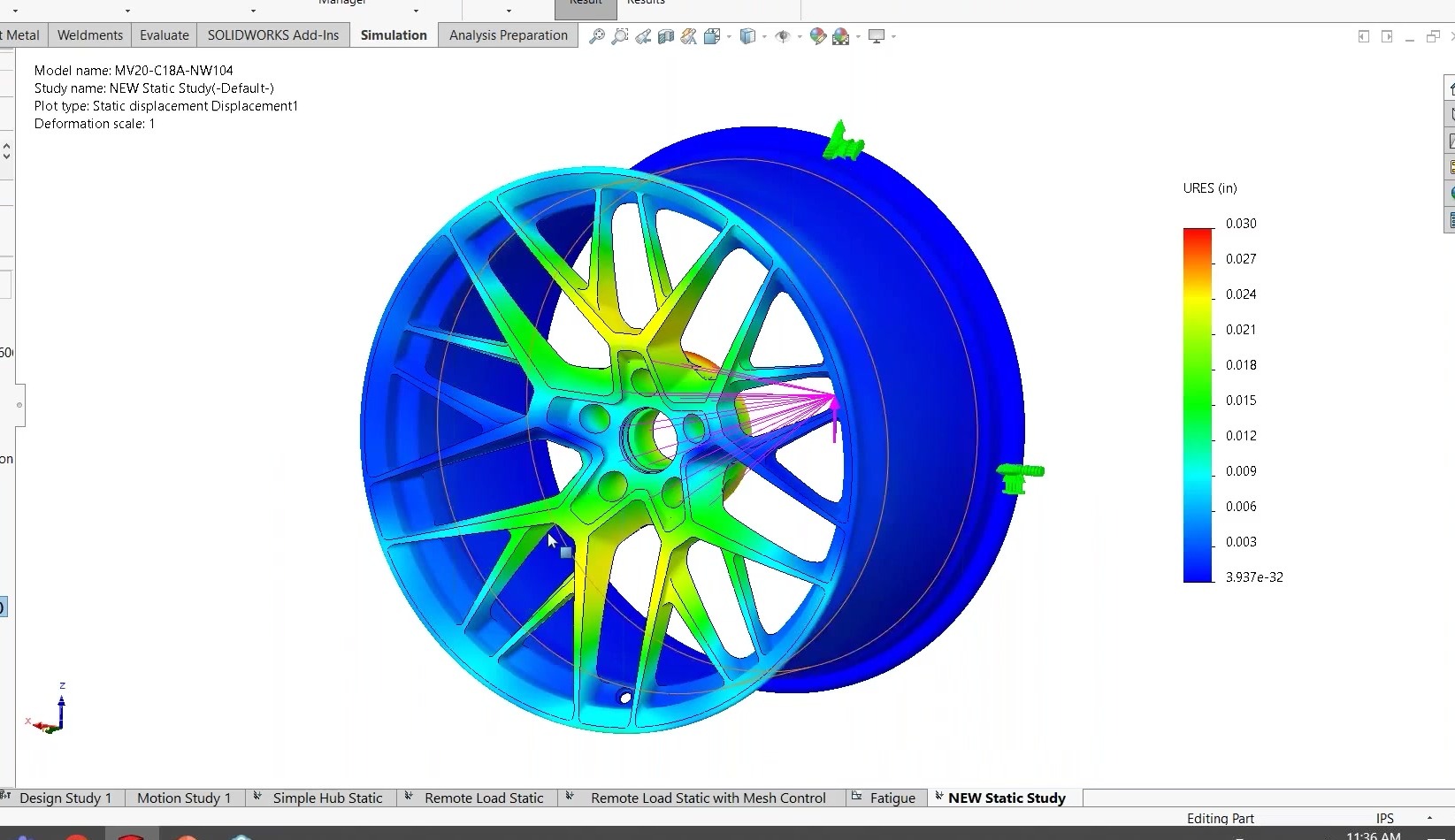
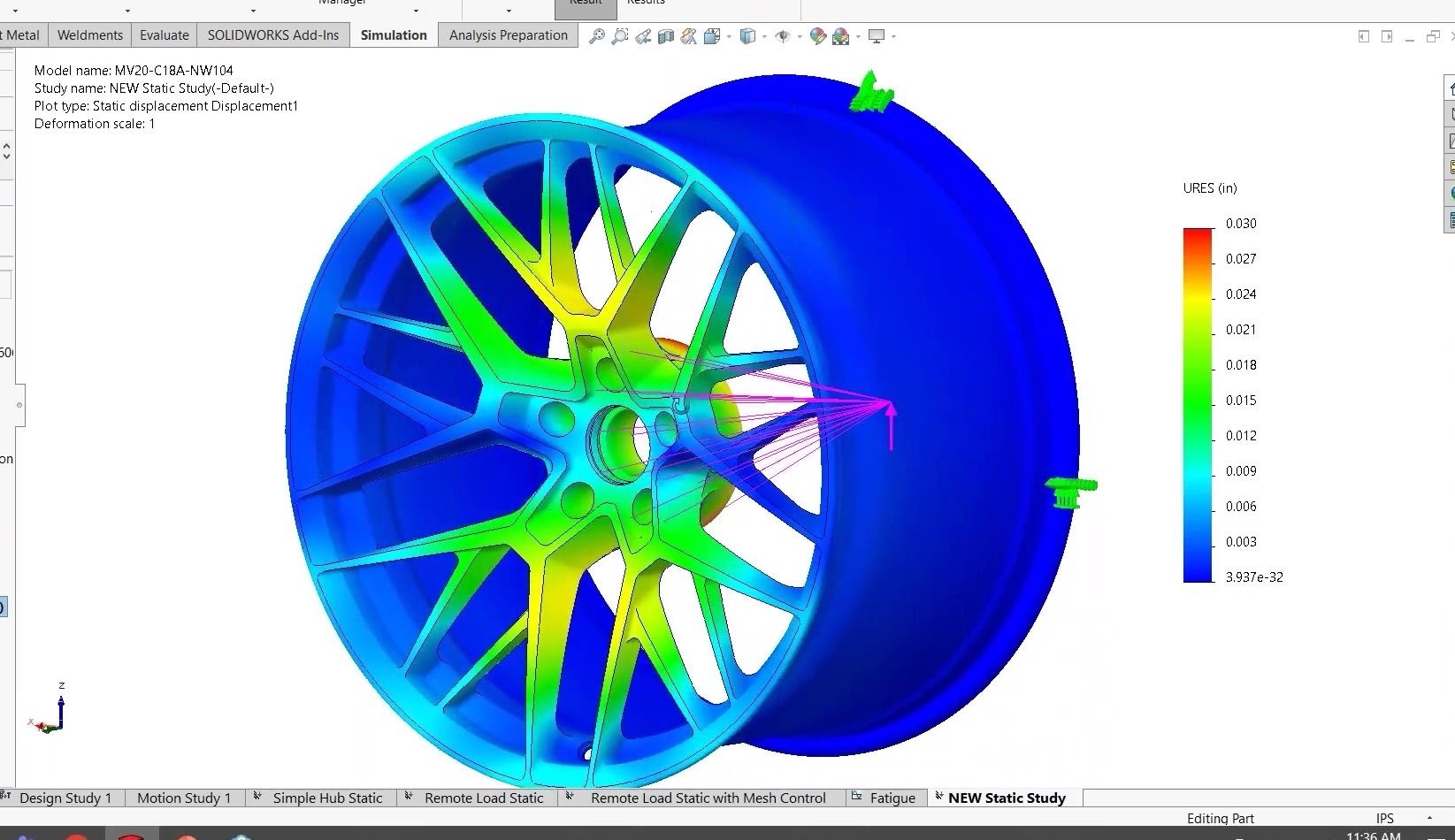
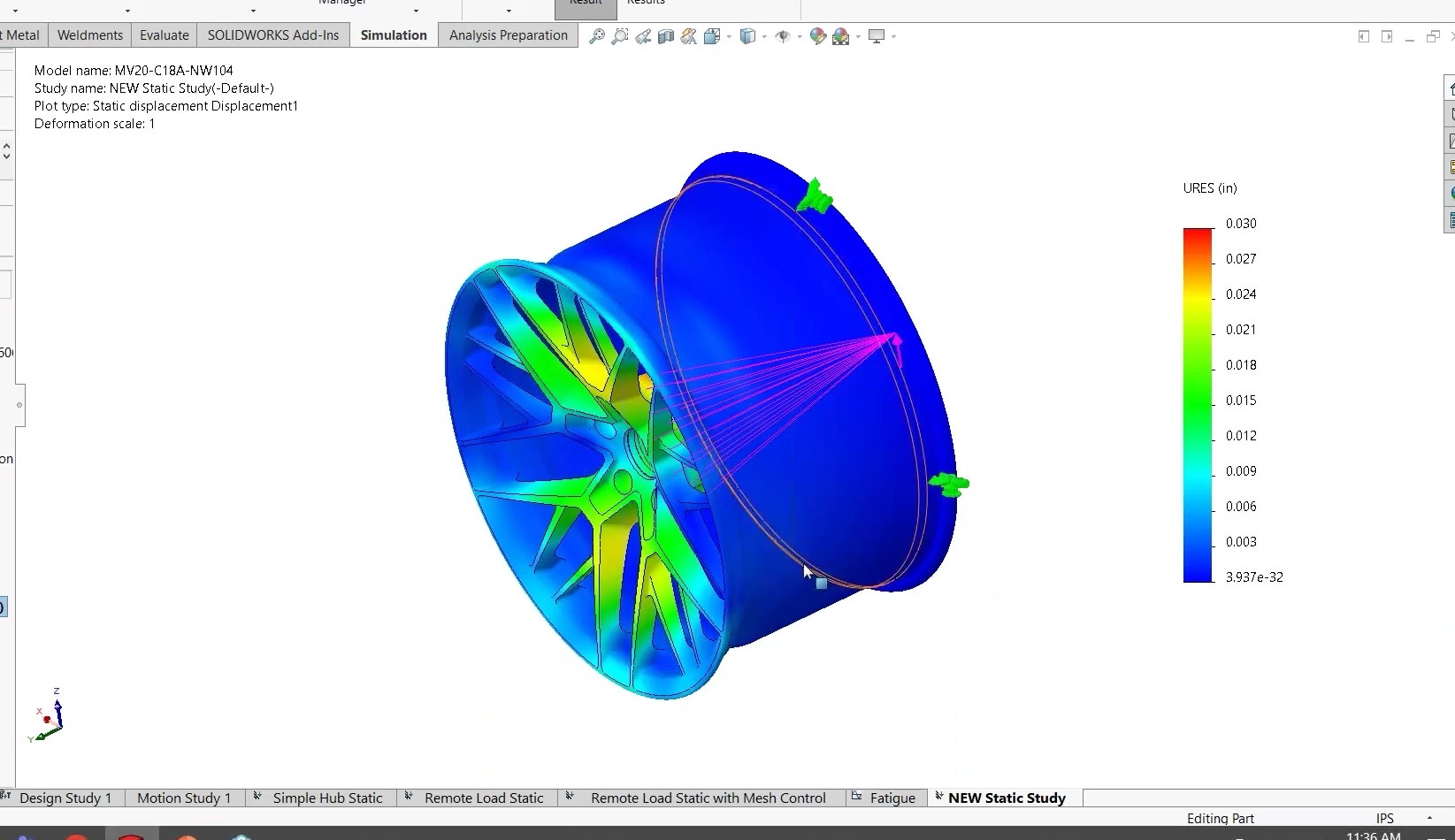
- Fixture — the outer rim is fixed, exactly as in the physical cornering-fatigue rig.
- Load — the real test applies the load to a hub 12 inches off the mounting face. Rather than modeling a 12-inch hub (and wasting solve time computing stresses in test equipment they do not care about), Forgeline uses a remote load at a coordinate system on the mounting face — 2,900 lb, one foot out. It is faster to set up and faster to solve. We cover this feature in detail in How to Apply a Remote Load in SOLIDWORKS Simulation.
- Mesh — the blended curvature-based mesher (the default) gives an efficient mesh with least effort. Notably, Forgeline skips local mesh control. Todd Larew found that hand-selecting fillet faces took ~5 minutes to save only ~40–50 seconds of solve time — so he uses a global mesh, walks away for coffee, and saves his time instead. (On other geometries local control pays off; know the difference — see curvature-based vs. standard mesher.)
- Static result — peak stress came in around 24 ksi, well below yield, with realistic deflection matching the test video.
- Fatigue study — the wheel must survive 200,000 cycles. Instead of hand calcs or spreadsheets (how they used to do it), the SOLIDWORKS Simulation fatigue study uses a stress-life (S-N) approach referencing the static study. Result: about 64% of material life used at 200,000 cycles — comfortable headroom to pass.
The Bigger Lesson: Be Practical, Not Perfect
The recurring theme is that a good simulation model is the one that gets you an actionable answer fastest — not the textbook-optimal one. Forgeline’s practical playbook:
- Simulate only the critical case (cornering fatigue), not all three tests.
- Use a remote load instead of extra hub geometry.
- Use a global mesh when local control does not pay for itself.
- Use built-in fatigue studies rather than spreadsheets.
- Use parametric optimization on a few key variables — not topology optimization, which produces shapes that clash with the aesthetic constraints wheel design demands.
On that last point: the parametric optimization example held peak stress just under 24 ksi while minimizing mass, and found that changing a fillet from 0.5 in to 0.585 in improved strength while adding only about 0.01 lb. Note too that each wheel size and offset is effectively a different wheel — an 18-inch is not simply a scaled 19-inch, since bolt features stay the same size — so Forgeline runs simulations across every size and offset they produce. For more on driving designs this way, see Driving Design with SOLIDWORKS Simulation.
Apply Their Best Practices to Your Own Simulation Study
You do not have to make wheels to benefit. The practical mindset — simulate the case that drives the design, avoid modeling what you do not care about, and let the software’s fatigue and optimization tools replace manual calculation — applies to almost any structural component. If you are weighing which package fits, our SOLIDWORKS Simulation buyer’s guide and instructor-led Simulation training are good next steps, and our engineers are always happy to talk through your specific application.
FAQ
Why does Forgeline only simulate the cornering fatigue test?
Their wheels must pass impact, radial fatigue, and cornering fatigue physical tests. Experience showed the eccentric-mass cornering fatigue test is almost always the critical case — a wheel that passes it also passes the other two. Simulating only that case removes redundant analysis while still guaranteeing all three tests are met.
What is a remote load and why use it here?
A remote load applies force at a point offset from the model without modeling the intervening geometry. Forgeline applies 2,900 lb twelve inches off the mounting face to represent the test hub, rather than modeling a 12-inch hub. It sets up faster and skips solving stresses in test equipment they do not need results for.
Why skip local mesh controls?
Local mesh refinement improves accuracy only where stress and deformation are high. On Forgeline’s wheels, hand-selecting fillet faces took about five minutes to save only 40–50 seconds of solve time. Using a slightly over-refined global mesh costs a little computer time but saves the engineer’s time.
How much did simulation save Forgeline?
We estimated physical testing would run roughly $250,000–$500,000 per year without simulation (2–3 wheel designs per week at about $1,250 per wheel test, often needing 2–3 iterations). With simulation, current physical testing spend is about $10,000 per year, plus far fewer failures — around one in the past ten years.