Every fall, SOLIDWORKS users get that familiar itch: What’s actually new this year?
This time, the answer feels different. The SOLIDWORKS 2027 Preview Program kicks off July 15, 2026, giving subscription customers and channel partners early beta access (mid-July through mid-August) to test new features under NDA.
If you’ve ever jumped into a game beta or new AI tool early, you know the rush: being first, testing real workflows, and shaping what ships. For designers and engineers, this Preview delivers exactly that — early looks at built-in SOLIDWORKS AI (LEO, AURA, MARIE), maturing drawing automation, continued large-assembly performance gains, and more.
The bigger shift? Dassault no longer drops one big October release. Enhancements now arrive year-round through Functional Deliveries (FDs). The fall release is the headline chapter in a continuous story — and Preview access lets you prepare, test in your environment, and give feedback that actually influences the final product.
AI Is the Through-Line: LEO Keeps Rolling Out
At 3DEXPERIENCE World 2026 in Houston this February, Dassault unveiled LEO, its agentic AI assistant — the next evolution beyond AURA. Where AURA tells you how to do something, LEO actually does it: reverse-engineering BREP bodies and 2D drawings into parametric models, generating manufacturable parts from sketch inputs, building assemblies from natural-language prompts, and setting up SIMULIA Abaqus simulations from a simple prompt.
The demo that stopped the room: SOLIDWORKS CEO Manish Kumar prompted LEO to design a steel structure frame supporting a water tank, accounting for Massachusetts wind loads. In under five minutes, LEO returned the complete assembly, 3D sketches and Structure System features, a validated linear static study, and a report on weight, footprint, and factor of safety.
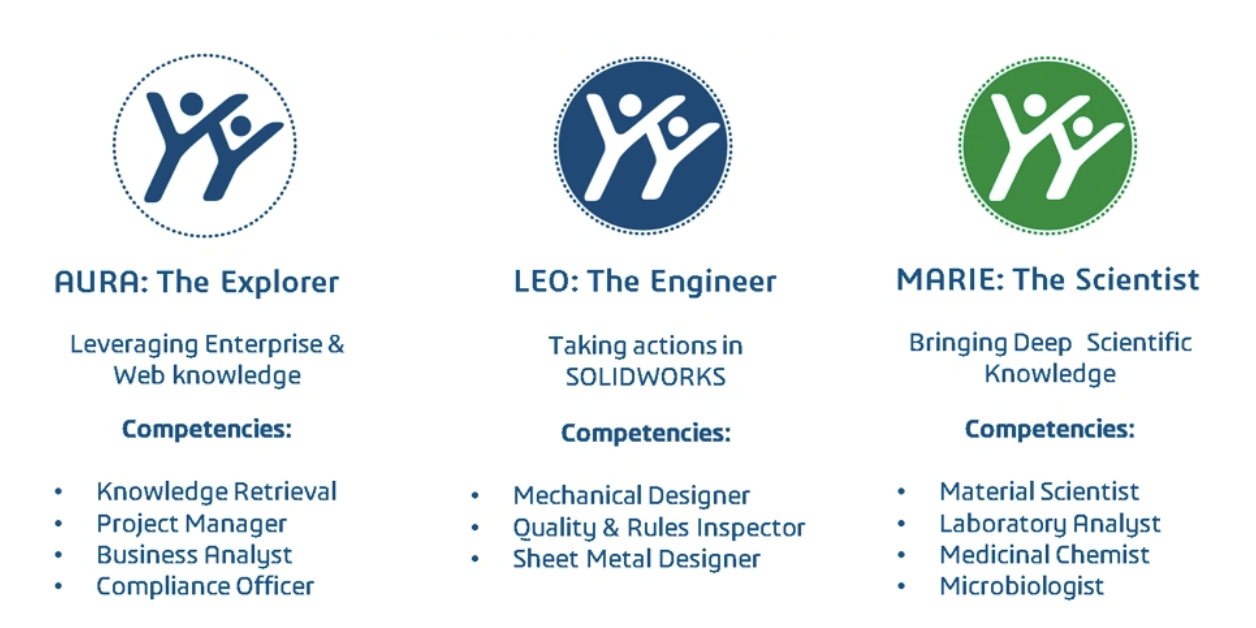
LEO’s first capabilities are already shipping in SOLIDWORKS 2026 SP1, accessible from the SOLIDWORKS Labs tab (now the Virtual Companions tab) in the Task Pane — assembly structure creation and automatic BREP-to-features conversion in xDesign. Dassault has said more capabilities are rolling out through SP2 and beyond, which puts additional LEO functionality squarely on the path toward the fall release. Built on the Dassault–NVIDIA “physical AI” partnership, LEO is designed to reason with physics and causality, not just text patterns. Kumar’s framing from the keynote: “AI is the multiplier. You are the value.”
Drawing Automation Is Maturing Fast
If you want a preview of how beta features graduate, watch auto-generate drawings. Introduced as a beta through the 3DEXPERIENCE add-in, it produces standard views, section views, hole callouts, driven dimensions, GD&T control frames and datums for parts, plus revision tables and bills of materials for assemblies — all generated in the background while you keep working. The output is a regular SOLIDWORKS drawing you can edit normally; the goal is to get the groundwork done so you spend your time on final detailing.
Two characteristics worth knowing: it’s a static AI model, so it isn’t learning from your drawings and your IP stays yours, and it requires a 3DEXPERIENCE platform connection — though a simple login and the SOLIDWORKS connector are enough, no full PDM implementation needed. Given the year-over-year expansion this feature has already seen, expect drawing automation to keep gaining ground in the fall release.
The 2026 Themes That Point Forward
Performance where it counts. SOLIDWORKS 2026 stopped flagging assemblies for rebuild over cosmetic-only edits — appearances, decals, non-driving sketches and planes now show a bracketed indicator instead of forcing a save and rebuild. This is an optional setting where you can choose whether it marks the assembly as modified (in need of a save), ignores it, or asks you to decide.
You can also hit Escape to cancel a lengthy rebuild mid-process. Note: This is actually specific to Parts, and specific features at that (Linear Pattern, Circular Pattern, Fillet, Chamfer). Expect large-assembly and parts performance to remain a priority.
Configurations and design reuse. The new split configurations command publishes one or more configurations as separate part files in a single step, with an “update where used” option that automatically remaps assemblies and drawings.
Manufacturing workflows. Sheet metal base flanges can now be offset from the sketch plane to support layout-sketch and master-model workflows; weldment cut-list properties like length are now available as file properties for drawing notes; structure systems show the full array of corner trim options; and CAMWorks added a dedicated Swiss-style CNC module with automatic feature recognition.
Smarter everyday tools. AI-recognized fasteners snap into SmartMates on drag-and-drop, search accepts non-native terms (it understands terminology from other CAD tools), and you can render directly from SOLIDWORKS to the Visualize engine without opening Visualize — included with Professional and Premium subscriptions.
Add-ins, too. PDM gained the ability to transfer ownership of checked-out files without losing work, and Simulation can now plot angular rotation directly as a displacement quantity for evaluating torsional stiffness.
Every one of these is a foundation the fall release builds on through the FD cadence.
One Compatibility Fact to Remember
Since SOLIDWORKS 2024, you can save files back to the last two releases. A feature that didn’t exist in the older version can’t be preserved — SOLIDWORKS warns you when saving — but this materially eases collaboration during the transition window when your team, suppliers, and customers are on mixed versions.
Get Upgrade-Ready with Hawk Ridge Systems
The 2027 release will arrive faster and evolve more continuously than ever. Now is the time to confirm your subscription, plan your rollout, and prepare your team.
Hawk Ridge Systems brings 28+ years of support from practicing engineers (430+ certifications, 99.8% satisfaction). Subscription customers receive proactive support and annual reviews. Our Elite plan adds unlimited SolidProfessor training, a training voucher, and expert consultations.
Need help planning your upgrade? Contact us.
We’ll do a deep dive into new enhancements in SOLIDWORKS and more at our annual Design to Manufacturing Conference this fall. Want to stay in the loop? Get our newsletter for updates.