SOLIDWORKS Flow Simulation
Quickly test the flow of air, gases, liquids, and heat while designing your 3D CAD models.
Get Pricing Sent to You Today
While you are waiting, check out our Resource Center or read our Blog!
Run Computational Fluid Dynamics Without Leaving CAD
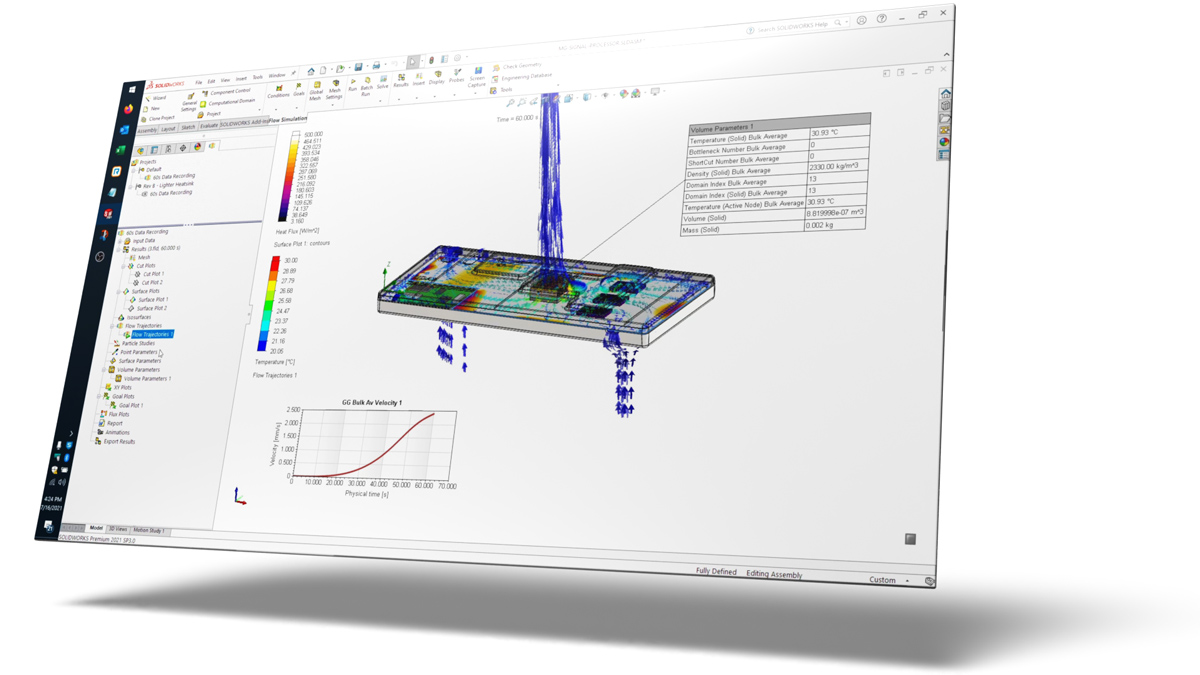
SOLIDWORKS Flow Simulation gives you powerful fluid flow analysis tools directly in your 3D CAD interface and offers easy, automated test setup and quick feedback.
With integrated computational fluid dynamics (CFD), you can predict how your product will behave under real fluid flow, airflow, aerodynamics, heat transfer, and cooling — so you can design and test at the same time.
Available fluid models you can simulate include ideal gas, real gas, liquids, compressible liquids, and non-Newtonian liquids.
-
Fully Embedded AnalysisRun simulations directly on parts and assemblies in SOLIDWORKS for easy comparison of design changes
-
CommunicationUse customizable simulation reports and eDrawings to share simulation results
-
External and Internal Fluid FlowsAnalyze fluids inside your geometry, around the outside, or both
-
Automatic Cavity/Fluid Volume DetectionDirect detection of fluid region(s) on your SOLIDWORKS models
-
Time-Dependent SimulationSimulate transient processes like start-up, cool down, or cycling
-
Subsonic, Transonic, and Supersonic RegimesAccurately simulate gas flows up to Mach ≈5
-
Conjugate Heat TransferAccurately calculate the temperatures in your model due to conduction, convection, and radiation
-
CavitationPredict areas of bubbling in liquids caused by pressure drop
-
Laminar and Turbulent FlowsPrediction of laminar-turbulent boundary layer development and associated effects
-
Rotating GeometryInclude rotating parts like pumps, fans, impellers, and more
-
Multi-Species FlowsPredict and simulate mixtures of liquids or gases
-
Export Results to SOLIDWORKS SimulationTransfer temperature and pressure results to stress analyses in SOLIDWORKS Simulation
-
Free Surface FlowsSimulate a liquid and gas in the same space (EX: filling, spraying, or sloshing)
-
Acoustics FFT PlotPredict fluid noise levels over a range of frequencies
-
Heat Flux SchematicView flow diagrams and pie charts of heat transfer between components
-
Basic Engineering DatabaseLibrary of fluids, materials, components, and more
-
Expanded Engineering DatabaseAdditional materials, components, thermal resistances and more (content differs for each add-on module)
-
Joule HeatingCalculate heating based on direct current electrical conditions (current, voltage, resistance)
-
Printed Circuit Boards ModelDefine circuit board layers for more accurate conduction
-
Heat Pipes ModelInclude the thermal effects of heat pipes
-
Two-Resistor (2R) Component ModelDefine electronic heat sources using JEDEC thermal resistance values
-
Semi-Transparent MaterialsPredict radiation heat absorption through glass, plastics, and more
-
Comfort ParametersIndustry-standard results for predicting environmental comfort such as MRT, MMV, PPD, ADPT, draft temperature, CRE, and LAQI
-
Tracer StudyView the flow path of an admixture tracer in a carrier fluid
Make Every Design Flow Better
Bring fluid dynamics into your everyday design work. SOLIDWORKS Flow Simulation lets you simulate how liquids and gases move, interact, and transfer heat, without leaving your CAD environment.
Visualize flow patterns, temperature, and pressure, so you can test and spot issues early, boost product performance, and hit your targets faster.
Simulation Resources
Success Story: Up for the Challenge
Watch Video
SOLIDWORKS Simulation Buyer's Guide
Download Guide
Predict Your Design’s Real-World Behaviors
Watch Video
Drive the Design Creation Process With Simulation
Download GuideFrequently Asked Questions
Yes, a SOLIDWORKS CAD license is needed, but it can be at any level – Standard, Professional, or Premium.
SOLIDWORKS Flow Simulation is available as both a perpetual license (with subscription) or as a term license. It can be activated on a particular machine or shared as part of a network license pool (additional costs apply).
If you’re unsure which license is best for you, reach out to us. We’re happy to help you!
The CFD results in Flow Simulation are reasonably close to real-world behaviors. When you’re simulating gases and liquids, make sure your inputs are similar to real scenarios, and you’ll get more realistic, accurate results.
If you have any questions about a particular flow you want to simulate, reach out to us, and we’ll help you find the right tool.
Nope, the hardware requirements are the same as those for SOLIDWORKS CAD. You can read our blog on the best recommended hardware to run the software.
If you’re already a Hawk Ridge Systems customer, we can help you get set up with Flow Simulation. Reach out to us.
Flow Simulation solves the Navier-Stokes equations (RANS and FANS) to calculate velocity fields, pressure, and other fluid parameters.
Yes, conduction, convection, and radiation are all directly calculated based on fluid flow, material properties, and other input conditions.
Yes, Flow Simulation can simulate complex models with both passive and forced air cooling. The optional Electronics Cooling add-on module supports further details, such as PCB layer properties and 2R component model for chips, and the HVAC add-on module to analyze air and gas movements through advanced radiation capabilities and tracer studies.
If you need the add-on or have any additional questions, contact us.
Most types of mechanical and free body motion are not supported. Rotating components, however, like fans and impellers can be simulated with the Sliding Mesh capability.
We can get you up to speed with our Flow Simulation courses. We offer a variety of instructor-led training courses and SolidProfessor on-demand training. If you’re a Hawk Ridge Systems customer with a SOLIDWORKS subscription, SolidProfessor access is included at no extra cost.
We can also offer training passes at affordable prices. Contact us for more details if you’re interested.
Services & Customer Benefits
Technical Support
The simulation experts on our technical team are available to assist with all your analysis questions and software troubleshooting, whether it’s a quick tech support call or an in-depth ‘Ask-an-Expert’ session.
Simulation Training
We’ve added extra content to our SOLIDWORKS Flow Simulation training, covering best practices and tips for project success. Choose from on-demand or live, instructor-led sessions to suit your schedule.
Professional Services
Leverage the expertise of our simulation team through consulting on your next project. We can assist you in developing your strategy and analysis approach to ensure the accuracy of your results.