
LIMITED-TIME OFFER! Save Up to 28% on SOLIDWORKS Perpetual Licenses

Save Now
Hawk Ridge Systems

2D & 3D ECAD Collaboration

SOLIDWORKS Electrical 3D

Create a smoother design process by unifying your 2D schematic designs and 3D CAD product models and your electrical and mechanical teams.

Develop 3D Models with Wires, Cables, and Harnesses in Mind

SOLIDWORKS Electrical 3D was built with collaboration in mind. This electrical design software allows you to easily connect your 2D schematics to 3D models in SOLIDWORKS, synchronizing changes you make with automatic updates in both designs. It also creates a collaborative environment for your mechanical and electrical design teams to work together in real-time, sharing the same databases.

With SOLIDWORKS Electrical 3D, you can effortlessly work with wire, cable, and harness lengths; combine electrical and mechanical bill of materials (BOMs) and other documentations; auto-route multiple electrical components; and much more, so you can estimate costs and reduce scrap.

solidworks electrical performance screenshot

Key Features & Benefits

ECAD & MCAD Collaboration

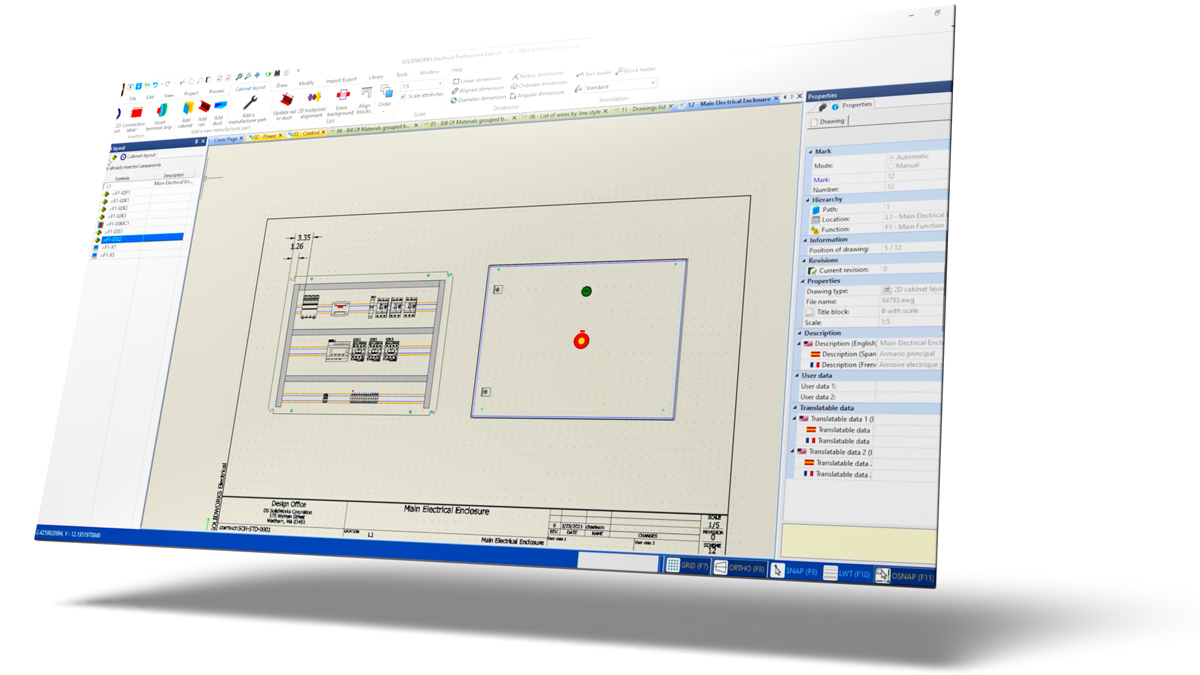
Schematic layouts from SOLIDWORKS Electrical can be intelligently mapped to SOLIDWORKS 3D CAD.

Single-Source Documentation

Keep electrical and mechanical docs in sync with automatic, bidirectional updates that simplify your workflow and cut out tedious document checks and changes.

Automatic Routing

Automatically connect components with the appropriate wire and cable types throughout the 3D model and optimize the path.

Consistent Assemblies

Auto-route schematically defined harnesses to plan detailed designs, visualizations, and documentation to produce consistent, detailed assembly drawings.

Real-Time Synchronization

Design updates to either the mechanical or electrical system are instantly synchronized to the model, allowing you to quickly adapt to change.

Simple Harness Design

Routing for simple electrical harnesses can be completed and documented.

Electrical Cabinet Design

Lay out components within an electrical cabinet or control panel automatically from the schematic control panel layout.

Exceptional Solutions, Even Better Support

Creating the best products requires the best solutions, training, and support. With a little insight into your product development process, our team of pros can point you to any tools you need (and nothing you don’t).

But it doesn’t end there. We’ll stay with you every step of the way, helping solve complex design issues, 3D printing application questions, and so much more. No matter where you’re at, both in your process and geographically, we’re here.

Keep On Learning

Electrical Resources

SOLIDWORKS Electrical Schematics: What Else Can It Do?

SOLIDWORKS Electrical Schematics: What Else Can It Do?

Smart Schematics Trend: Are They Worth the Change?

Smart Schematics Trend: Are They Worth the Change?

Frequently Asked Questions

Engineering Success Together

Services & Customer Benefits

Technical Support

Our technical support team is comprised of mechanical engineers, electrical engineers, and computing specialists who provide best-in-class on-call support and Ask-an-Expert sessions when you need it the most.

Unmatched Training

We are the largest SOLIDWORKS training provider in the world, offering both online and on-demand training so your team knows how to get the most out of SOLIDWORKS.

Professional Services

From software implementation to data migration to consulting, we will be there for you through every step of your SOLIDWORKS journey to ensure your productivity, success, and growth.

Subscription Support

Whether you are looking for on-demand SolidProfessor training, access to the latest software releases, exclusive resources and offers, or just need expert support, we have a subscription option for you.