

Every company runs on processes, and most of them still run on email. A request gets forwarded, a spreadsheet gets passed around, and a manager chases status in the hallway. I recently hosted a Hawk Ridge Systems webinar with a solution to that problem.
In Engineering Process Automation with Business Process Management, I was joined by two guests from Dassault Systèmes: Marc B. Sauro, BPM Sales & Enablement Lead, North America, and Brian Lau, Senior Industry Process Consultant. Together we explained what Business Process Management (BPM) on the 3DEXPERIENCE platform is, then walked through a live process from the first customer request to a signed contract.
What Business Process Management Means for Engineering Teams
Marc opened with a simple question for the audience: If you could change one process, which one would it be? The answers do not have to be engineering answers. He mentioned onboarding new employees, procurement, and even the visitor logbook at a customer's front desk.
His one-line definition of BPM was: "The right task to the right stakeholders with the right information at the right time."
In practice, that means no missed steps, no lost information, and a single source of truth for the process itself, not just for the files. I first discovered business process modeling while helping a client whose needs reached across multiple departments, well beyond CAD. As I put it in the webinar: "Honestly, I don't know a company that couldn't benefit from some aspect of this."
Signs Your Processes Are Running on Email, Excel, and Paper
Our conversation listed some of the symptoms most teams will recognize:
- Follow-ups by email, phone, and instant messaging
- Time lost searching for data
- Homegrown applications and duplicate entries that are hard to scale
- Informal requests with no traceability, history, or audit trail
- Large Excel files sent to a whole team when each person only needs one block of cells
Marc called these "the did you monster." BPM replaces it with forms and tasks that show each person only what they need. It can also connect to Word and Excel and fill in forms you keep as Word templates or PDFs.
How a BPM Process Is Built: Events, Tasks, and Gateways
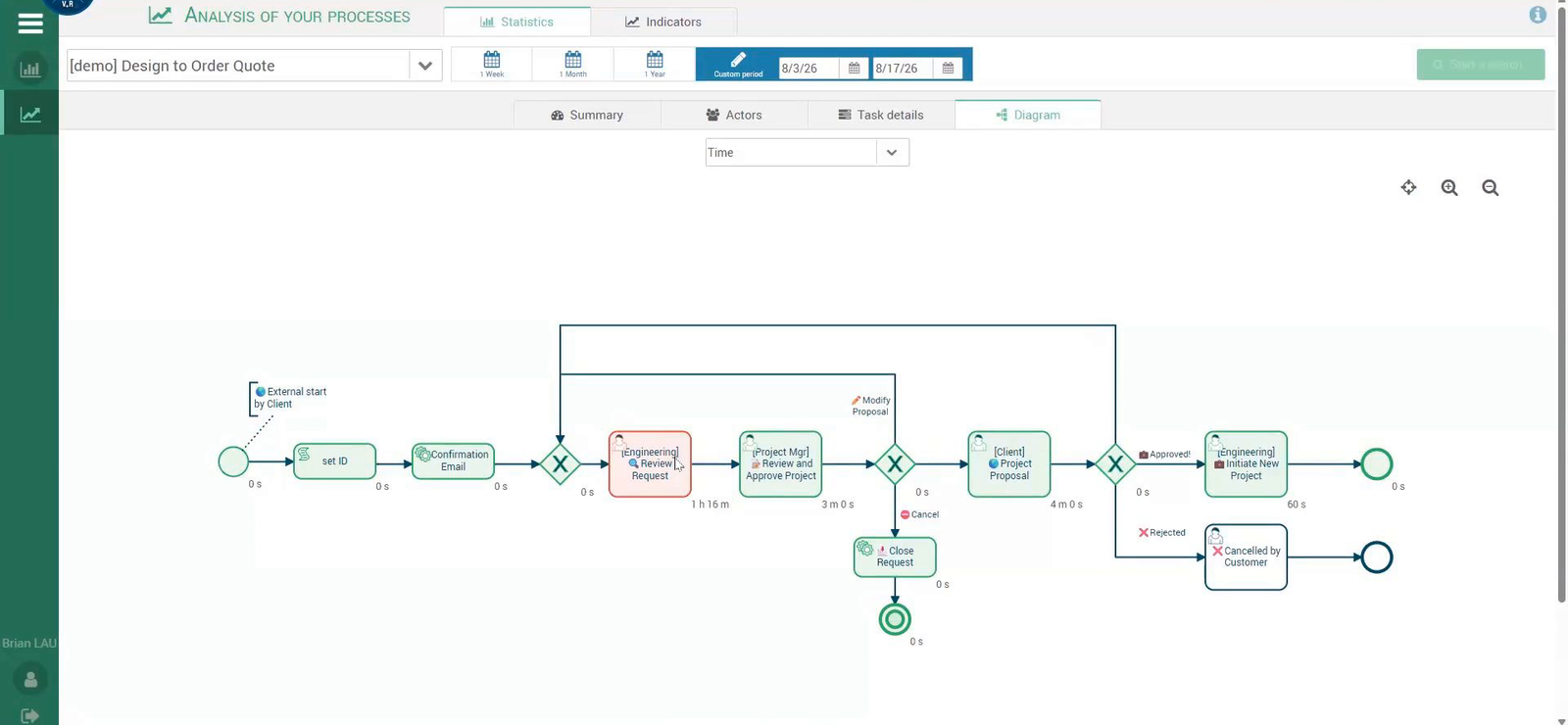
If your team already sketches processes in a diagramming tool like Visio, the modeling language will feel familiar. Marc described three building blocks:
- Events: Shown as circles
- Tasks: Shown as rectangles
- Gateways: Shown as diamonds, the "revolving doors" where a request can go one route or another
I pointed out that a left-to-right diagram also documents standards, supports training, and captures know-how that usually lives in a few people's heads.
Processes can be internal, such as a new product request from sales, or external, such as a customer request for quote (RFQ) or a supplier audit. Because BPM is an enterprise tool, not a feature tied to PDM or PLM, any department can use it.
Inside the Demo: A Request for Quote from Form to Signed Contract
Brian built the live demo around a fictional company, Blue Cooling, that supplies HVAC systems for data centers. I played the customer, Marc played the project manager, and Brian played the engineer.
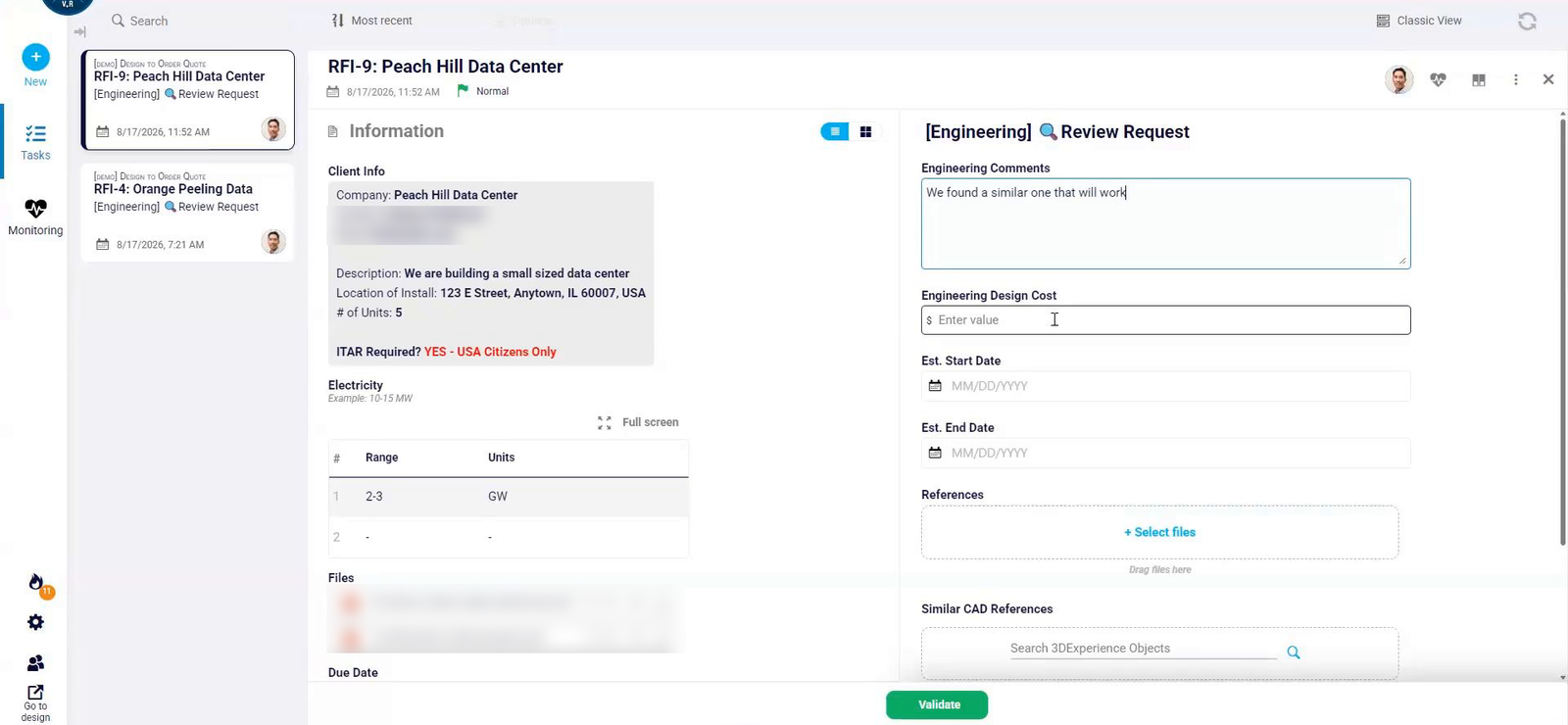
- The customer submits a guided form: I filled out an RFQ form from a QR code or link. The form steered me as I went. Dates the company could not deliver were grayed out, the minimum order of five units was enforced, a spreadsheet-style table captured line items, and a required ITAR question stopped submission until I answered it. I received a confirmation email right away.
- Engineering reviews in one place: Brian saw the request, its files, and his task form side by side, with no downloads or SharePoint digging. He added a rough estimate and linked reference CAD files and documents from the 3DEXPERIENCE platform. The system already knew who his manager was.
- The manager decides: Marc reviewed the original request next to the engineering work and could close it, send it back for changes, or approve it. Linked files stay live, so the process always points to the latest revision. As Marc put it, "We're not creating a parallel world. We're just linking to a single source of truth."
- The customer responds through a task, not an email thread: After approval, I received an email linking to my own task. I could not move forward until I accepted the terms and attached a signed contract.
- The project kicks off: Back at Blue Cooling, a new-project task appeared with the full history, a required checklist, and the ITAR flag, so the team could confirm U.S. citizens were staffed on the project. Work could be saved and resumed later.
Finding Bottlenecks with Process Analytics
Managers no longer have to call or email for status. Brian showed a table of every process in flight, with columns set to the KPIs that matter most. Clicking a completed request showed the path it took, who participated, any delegations, and timestamps.
Analytics then showed how often each gateway route was taken and how long each step took. In the demo, the engineering review step stood out in red. Marc's conclusion was simple: Assign more people to review requests.
Where BPM Fits Alongside PDM, PLM, and Your Other Systems
BPM is meant to connect to the tools you already use, not replace them. We mentioned:
- The 3DEXPERIENCE platform: Links live CAD files and PLM documents into a process
- REST API connections: Connect to CRM, ERP, DocuSign, Dropbox, and on-premises systems
- Large language models: OpenAI and other LLMs can handle AI steps such as first-line customer support.
- AURA: Dassault Systèmes' AI assistant, which Brian said is being embedded to summarize, translate, and recommend inside a process.
It is also a cloud tool, so there is nothing to install.
If your team uses SOLIDWORKS PDM today, that remains the place to vault files and control revisions. SOLIDWORKS PDM Standard is included with SOLIDWORKS Professional and above, and it supports a single, simple approval workflow. BPM addresses the cross-department processes that sit around those files, such as quoting, onboarding, NDAs, and campaign kickoffs.
Start Small, Then Let It Spread
Marc shared how Danone started with a few departments running simple processes, and how other departments asked to join once they were collaborating with those teams. I noticed that engineering and legal joined later. Marc said Dassault Systèmes uses the tool across its own departments as well. His advice: "You start small, and it will grow."
Marc argued this matters most for small and midsize companies, where employees wear two or three hats. He said that, after a two-hour discovery and hands-on session built around one of the customer's own processes, "Most of our customers are up and running under a month." Brian said the demo process took him about two to three hours to build, plus about an hour and a half to incorporate feedback.
Frequently Asked Questions
What is Business Process Management (BPM) in 3DEXPERIENCE?
It is a way to model a process as events, tasks, and gateways, then automatically route each task to the right person with the right information. Requests, approvals, and history are tracked in one place instead of in email and spreadsheets.
Is BPM only for engineering processes?
No. The webinar covered RFQs, new employee onboarding, procurement, NDAs, marketing campaign kickoffs, and supplier audits. Processes can involve internal teams, customers, and suppliers.
Does BPM replace SOLIDWORKS PDM?
No. PDM manages CAD files, revisions, and file workflows. BPM coordinates business processes across departments and can link to live files on the 3DEXPERIENCE platform as a single source of truth.
Do I need IT to build a process?
No. Teams that know their process can design it themselves, and the tool connects to other systems through REST APIs when needed.
Keep Learning
- SOLIDWORKS Change Management: Using 3DEXPERIENCE to Manage Your Design Changes
- Explore the 3DEXPERIENCE Platform Project Management Tools
- 3DEXPERIENCE Data Management: How Does It Actually Work?
- Better Manage Your Projects, Processes, and BOMs with SOLIDWORKS Manage
Watch the Full Webinar
Webinar Timestamps
- 0:06 Welcome and why process automation matters
- 1:35 One process you would change
- 2:31 Email, Excel, and paper symptoms
- 3:52 BPM in one line
- 6:28 Events, tasks, and gateways
- 12:02 Live RFQ demo with Blue Cooling
- 25:36 Manager view and process analytics
- 28:00 Finding bottlenecks
- 30:27 Connections to 3DEXPERIENCE, DocuSign, and AI
- 36:51 Start small and go live in under a month
See Brian's full RFQ demo in the on-demand recording of Engineering Process Automation with Business Process Management. To explore the platform, visit 3DEXPERIENCE and 3DEXPERIENCE Cloud PLM. Have a process you would change first? Contact Hawk Ridge Systems to talk it through with our team.
Put your next design into motion
Explore solutions and expert guidance for your application.
Ask an EngineerWritten by Andrew ParkhurstTechnical Account Manager